
Introduction
Have you ever noticed a small padlock icon in your browser address bar when visiting a website? Or seen "https://" at the start of a URL instead of "http://"?
That padlock is an SSL certificate in action and it is one of the most important elements of any modern website.
If your website does not have one, visitors see a "Not Secure" warning in their browser. Google ranks your site lower in search results. And any data your visitors enter contact form details, payment information, login credentials is potentially exposed.
For a small business, startup, or any brand that wants to be taken seriously online, SSL is not optional. It is essential.
This beginner guide explains exactly what an SSL certificate is, how SSL works, why it matters for your website, and how to get one set up quickly and affordably.
What Is an SSL Certificate?
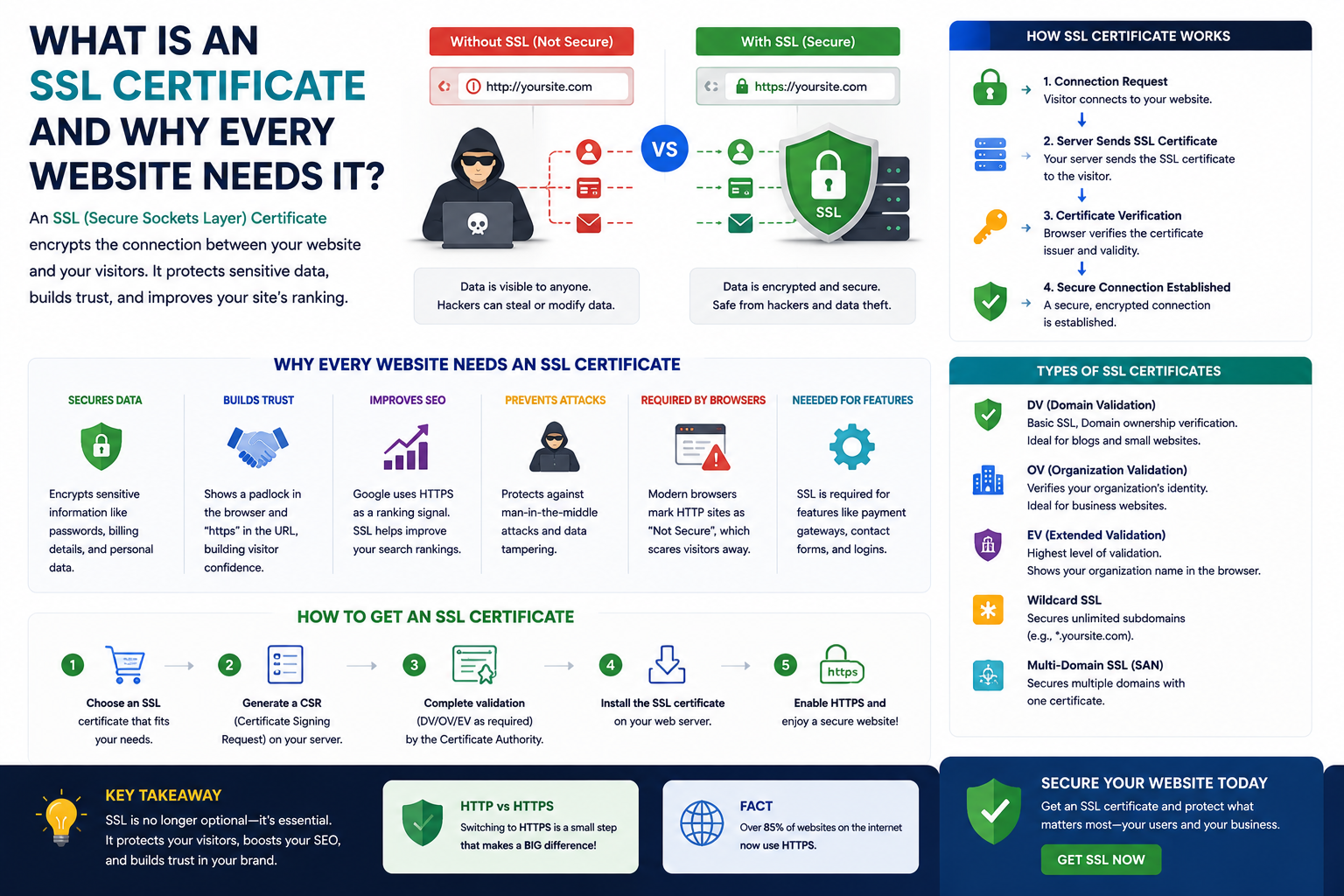
SSL stands for Secure Sockets Layer a security technology that creates an encrypted connection between a web server (where your website lives) and a visitor browser.
In plain English: SSL scrambles the data that passes between your website and your visitors so that nobody in between can read, intercept, or tamper with it.
When a website has a valid SSL certificate installed, its URL starts with HTTPS (HyperText Transfer Protocol Secure) instead of HTTP. That "S" stands for secure and it is backed by the SSL encryption running in the background.
You will also see the padlock icon in the browser address bar. Click it and you will see details about the certificate who it was issued to, who issued it, and when it expires.
Technically, most modern SSL certificates actually use a newer protocol called TLS (Transport Layer Security) but the term "SSL" has stuck and is still used universally in everyday conversation.
How Does SSL Work?
Understanding how SSL works helps you appreciate why it matters and why the alternative (HTTP) puts your visitors at risk.
Here is the simplified version of what happens every time someone visits an HTTPS website:
- Step 1 - Handshake: The visitor browser contacts your web server and asks it to prove its identity
- Step 2 - Certificate check: Your server sends its SSL certificate to the browser, which verifies it was issued by a trusted Certificate Authority (CA) - organisations like Let's Encrypt, DigiCert, or Comodo
- Step 3 - Encryption key exchange: The browser and server agree on an encryption method and exchange keys
- Step 4 - Secure connection established: All data exchanged from this point is encrypted - completely unreadable to anyone attempting to intercept it
- Step 5 - Padlock appears: The browser displays the padlock icon, confirming the connection is secure
This entire process happens in milliseconds invisibly, before the page even loads. Visitors do not see it happening. They just see the padlock and feel safe.
Without SSL, that data travels in plain text. Anyone on the same network a cafe Wi-Fi, for example could potentially intercept and read it.
HTTPS vs HTTP: What Is the Real Difference?
The difference between HTTP and HTTPS is not just a letter. It is the difference between a secure, encrypted connection and an open, vulnerable one.
| Feature | HTTP | HTTPS |
|---|---|---|
| Data encryption | None | Full SSL/TLS encryption |
| Padlock in browser | No | Yes |
| Browser warning shown | "Not Secure" | No warning |
| Google ranking signal | Negative | Positive |
| User trust | Lower | Higher |
| Required for payments | No (but dangerous) | Yes (mandatory) |
Every modern browser Chrome, Safari, Firefox, Edge actively flags HTTP websites as "Not Secure." When a visitor sees that warning before they have even read a word of your content, many of them leave immediately.
For any business website, that is lost traffic, lost leads, and lost revenue from a problem that costs almost nothing to fix.
Why SSL Certificate Is Important: The Key Benefits
1. Protects Your Visitors' Data
This is the core function of SSL. Any information a visitor submits through your website contact forms, quote requests, email sign-ups, login details, payment information is encrypted and protected from interception.
Without SSL, that data is transmitted in plain text. It is exposed.
2. Builds Trust and Credibility
The padlock matters psychologically. Studies consistently show that website visitors actively look for the padlock before submitting any personal information and many refuse to engage with sites that display the "Not Secure" warning.
For a small business trying to compete with larger brands, trust signals like SSL are not just nice to have. They directly influence whether a visitor becomes a lead.
3. Improves Your Google Rankings
Google officially confirmed that HTTPS is a ranking signal. Websites with SSL certificates get a ranking boost over equivalent HTTP sites. For a small business investing in SEO, having SSL installed is one of the easiest technical wins you can implement.
4. Required for eCommerce and Online Payments
If you take any payments online through Stripe, PayPal, WooCommerce, or any other payment processor SSL is not optional. It is a mandatory requirement of the Payment Card Industry Data Security Standard (PCI DSS). Processing card payments on an HTTP site is a compliance violation, full stop.
5. Prevents Browser Warnings That Drive Visitors Away
Chrome marks HTTP sites as "Not Secure" directly in the address bar. On mobile, this warning is even more prominent. Every visitor who sees this warning and clicks away is a lost opportunity - and it happens thousands of times a day on unsecured sites.
Is your website still showing "Not Secure"? Get in touch with Elevix Digital - we will install and configure your SSL certificate quickly, along with a full website security check.
Do All Websites Need an SSL Certificate?
Yes - without exception. Here is why there are no edge cases:
- Informational sites - Even if you are not collecting data, visitors still see the "Not Secure" warning and Google still penalises the site in rankings
- Blogs - Readers trust sites with HTTPS. Comment sections and email sign-up forms process data that needs protecting
- Service business websites - Contact forms and quote requests submit personal information that requires encryption
- Ecommerce sites - Mandatory for payment processing. No exceptions
- SaaS and web applications - User login credentials, account data, and application behaviour all require SSL as an absolute minimum
If your website exists and people visit it, it needs SSL. The only question is which type.
Types of SSL Certificates
Not all SSL certificates are the same. Here is a simple breakdown:
Domain Validated (DV) SSL
- Verifies that you own the domain nothing more
- Fast to issue (minutes to hours)
- Suitable for: blogs, informational sites, small business websites
- Cost: Free (Let's Encrypt) to $50/year
Organisation Validated (OV) SSL
- Verifies the domain and confirms the organisation behind it is legitimate
- Takes 1-3 days to issue
- Suitable for: business websites, professional services, SaaS products
- Cost: $50-$200/year
Extended Validation (EV) SSL
- The highest level of validation full legal and organisational verification
- Previously showed a green address bar in browsers (now phased out)
- Suitable for: large ecommerce, financial services, enterprise
- Cost: $100-$500/year
Wildcard SSL
- Secures a domain and all its subdomains (e.g., shop.yourdomain.com, app.yourdomain.com)
- Suitable for: businesses running multiple subdomains on the same root domain
- Cost: $100-$400/year
For most small businesses: A Domain Validated (DV) SSL is perfectly sufficient and often free through Let's Encrypt which most quality hosting providers include automatically.
How Much Does an SSL Certificate Cost?
Here is the good news: for most small business websites, SSL costs nothing.
Let's Encrypt is a non-profit Certificate Authority that issues free, trusted SSL certificates and is supported by virtually every major hosting provider. If you are on Kinsta, SiteGround, WP Engine, Cloudways, or most modern hosting platforms, SSL is included in your plan.
Summary of SSL certificate costs:
- Free (Let's Encrypt / included with hosting): $0/year suitable for most small business websites
- Basic DV SSL (paid): $10-$70/year
- OV SSL: $50-$200/year
- EV SSL: $100-$500/year
- Wildcard SSL: $100-$400/year
If your hosting provider does not include a free SSL, it is a strong signal to consider switching hosts because good hosting in 2026 almost always includes it.
How to Install SSL Certificate on WordPress (Overview)
Installing SSL on a WordPress website is straightforward when done correctly. Here is the general process:
- Step 1 - Check if your host provides free SSL. Log into your hosting control panel (cPanel, Plesk, or your host dashboard) and look for an SSL or Let's Encrypt section. Most quality hosts let you activate it in one click.
- Step 2 - Activate SSL from your hosting dashboard. Select your domain and click to issue/activate the SSL certificate. It usually takes a few minutes to generate and install.
- Step 3 - Update your WordPress URL to HTTPS. Go to Settings > General in your WordPress dashboard and update both the WordPress Address and Site Address from http:// to https://.
- Step 4 - Force HTTPS site-wide. Install a plugin like Really Simple SSL or add an HTTPS redirect in your .htaccess file or server configuration. This ensures every page loads over HTTPS automatically.
- Step 5 - Fix mixed content warnings. Some images, scripts, or links may still reference the old HTTP URLs. Use a plugin like Better Search Replace to update them database-wide, or manually update any hardcoded HTTP links.
- Step 6 - Test your installation. Use a tool like SSL Labs (ssllabs.com/ssltest) to verify your certificate is correctly installed and your site scores well.
This process typically takes 30-60 minutes for someone familiar with WordPress. If you would rather not touch the technical side, it is something any competent web developer can handle in under an hour.
Want SSL installed correctly along with a full security setup for your WordPress site? Elevix Digital can handle it for you - we configure SSL, fix mixed content, and secure your site properly so you can focus on your business.
Is SSL Necessary for Small Business Websites?
Absolutely and this question is increasingly being asked the wrong way around.
The right question is: can a small business afford not to have SSL?
Consider what you lose without it:
- Potential customers who see "Not Secure" and immediately leave
- Lower Google rankings compared to your HTTPS competitors
- Risk of exposing your visitors data and your reputation along with it
- Inability to run any kind of ecommerce or payment processing
- Zero chance of being taken seriously as a professional business online
SSL costs nothing for most small businesses. The cost of not having it in lost visitors, lost rankings, and lost credibility is far higher.
Conclusion: SSL Is the Minimum Standard - Make Sure You Meet It
An SSL certificate is no longer a premium feature for serious websites. It is the baseline standard expected by browsers, required by Google, demanded by visitors, and mandatory for any site processing data.
The good news? For the vast majority of small businesses, it costs nothing and takes less than an hour to set up.
If your website still shows "Not Secure" in the address bar, fixing it should be at the top of your to-do list. Not next month. Today.
Everything else you do to grow your online presence SEO, content marketing, paid ads, social media works better when it is built on a foundation visitors actually trust.
Want SSL Installed Correctly - Along With Full Website Security?
At Elevix Digital, we handle SSL installation and complete website security setup for small businesses, startups, and growing brands - quickly, correctly, and without technical headaches on your end.
What we take care of:
- SSL certificate installation and HTTPS configuration
- Mixed content fixes and full HTTPS redirect setup
- WordPress security hardening and malware protection
- Speed and performance optimisation alongside security
- Daily backup configuration and monitoring
- Monthly maintenance reports with clear plain-English summaries
- Full web design, WordPress development, and SEO services too
Whether you need a quick SSL fix or a complete website security overhaul - we have got you covered with transparent pricing and a team that explains everything in plain language.
Get Your Free Website Security Check from Elevix Digital - We will review your SSL status, security setup, and overall website health, and tell you exactly what needs attention.
Frequently Asked Questions
What is an SSL certificate?
An SSL certificate is a digital security credential that encrypts the connection between your website and your visitors browsers. It protects data in transit, authenticates your website identity, and enables HTTPS. You can identify a site with SSL by the padlock icon in the browser address bar and the "https://" prefix in the URL.
Do all websites need an SSL certificate?
Yes. Google penalises HTTP sites in search rankings, modern browsers display a "Not Secure" warning for sites without SSL, and any website that collects user data through contact forms, sign-ups, or payments is legally and ethically obligated to protect that data. SSL is a basic, non-negotiable requirement for any professional website in 2026.
How much does an SSL certificate cost?
For most small business websites, SSL is completely free through Let's Encrypt which most quality hosting providers include automatically. Paid SSL certificates range from $10-$70/year for basic DV SSL up to $500/year for Extended Validation certificates used by financial and enterprise organisations. If your host charges extra for basic SSL, consider switching to a better provider.
Is SSL necessary for small business websites?
Yes, unconditionally. Even informational websites without ecommerce or logins are penalised by Google and flagged as "Not Secure" in browsers without SSL. For any business using contact forms, email sign-ups, or online bookings, SSL is essential for data protection, user trust, and search visibility. The good news is that it is free for most small businesses.
How do I install an SSL certificate?
Most hosting providers let you activate a free Let's Encrypt SSL certificate directly from your hosting dashboard with one click. On WordPress, you then update your site URL to HTTPS in Settings > General, set up an HTTPS redirect, and fix any mixed content warnings using a plugin like Really Simple SSL. The full process takes 30-60 minutes. Elevix Digital can handle the complete setup if you would prefer professional installation.

Elevix Digital
Elevix Digital helps businesses build stronger websites, SEO systems, SaaS platforms, and digital marketing foundations for measurable growth.
View all postsNeed SSL installed correctly with full website security?
Elevix Digital handles SSL installation, HTTPS configuration, mixed content fixes, WordPress security hardening, backups, monitoring, and maintenance for growing businesses.